
The routines that run my company's outreach, releases and reporting live in two schedulers: ChatGPT's and Claude's. Over thirty jobs, some every few minutes.
On October 25, ChatGPT reached its usage limit, and the next morning every job had to move to Claude, one by one. On November 14 Claude ran out, and every job moved back. Each move took about fifteen minutes of pausing, porting and checking. Until it was done, the jobs waiting on the empty agent did not run.
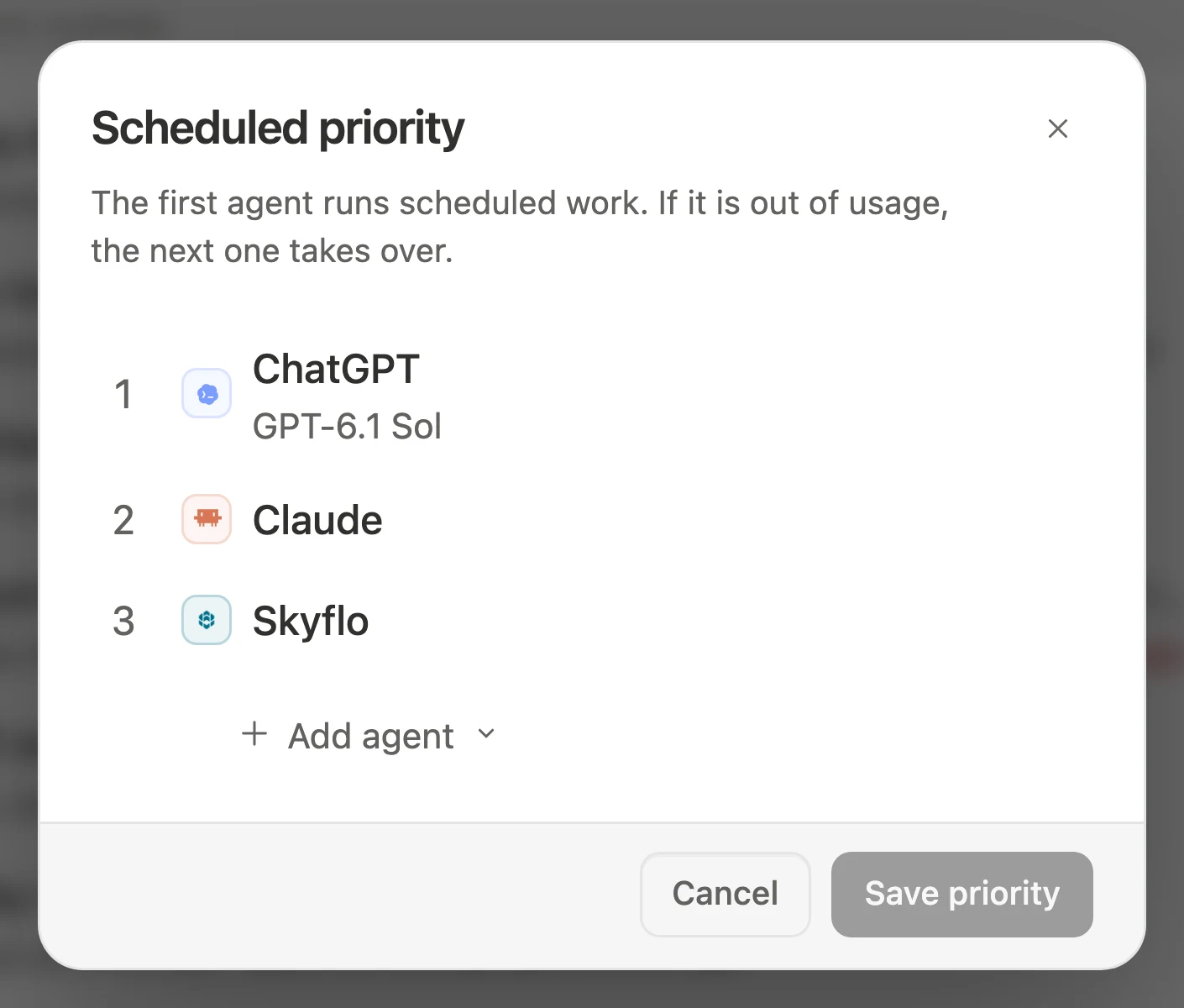
Neither scheduler knows the other exists. Skyflo's routines do. They follow one priority list across ChatGPT, Claude and Skyflo's own agent, so scheduled work keeps going when one of them runs out. It is part of how Skyflo runs your missions.
How do Skyflo routines survive agent usage limits?
A Skyflo routine runs on the first agent in your scheduled priority list. If that agent cannot take the run when it starts, because it is out of usage, signed out or unreachable, the next agent on the list takes it. If it runs out of usage partway through, the same mission continues on the next agent. Your list keeps its order, so the next run starts at the top again.
This priority fallback shipped in Skyflo 1.8.1. Skyflo 1.8.3 added uniform limit reporting across agents, naming which limit was hit and when it resets.
How does each routine choose its agent?
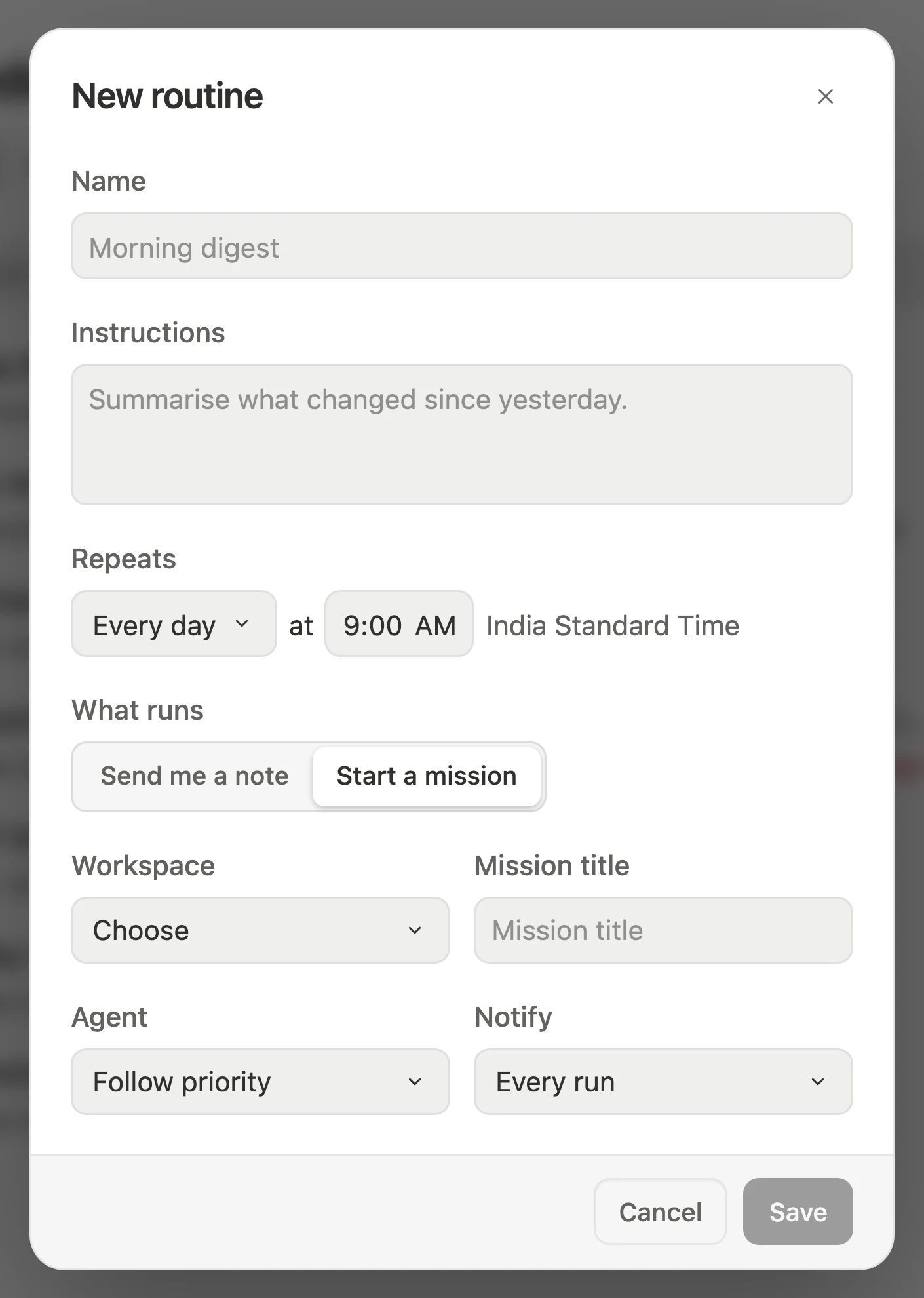
Each Skyflo routine can follow your priority list, stay on an existing mission's agent, or stay pinned to one agent and model. You choose it in the routine editor, from the agents connected to Skyflo on your Mac.
- Follow priority. The routine uses your scheduled priority list: up to eight agents, each with its own model and reasoning level, in the order you set. The first runs scheduled work, and each agent after it acts as fallback for the one before.
- Each mission's agent. A routine that continues one of your missions uses whatever agent that mission uses today.
- One agent. The routine is pinned to a single agent and model and stays there even when your list changes.
A daily research digest might follow priority with ChatGPT first, Claude second and Skyflo's own agent third. A routine that needs one model for consistency stays pinned.
What moves a run to the next agent, and what stops it?
A run moves down your priority list only when the agent ahead of it cannot take work right now due to usage or availability. A policy or permission refusal never triggers a fallback; the routine stops and tells you instead.
| Situation | What the routine does |
|---|---|
| Usage limit reached, signed out, not ready, key issue, provider unreachable, or unavailable model | Moves the run to the next available agent on your priority list |
| Limit hits halfway through a routine that starts a new mission | Keeps the mission and continues on the next agent as a new attempt on the same run |
| Every agent on the priority list is out of usage | Ends the run and reports that every agent on the list was out of usage |
| Policy or permission says no | Stops there and tells you; never goes around a no by asking another agent |
Your priority list serves as your consent for availability fallbacks because you put the agents in that order. The list itself never reorders, so the next scheduled occurrence always starts at the top again, where your first choice is usually ready by then.
How do you tell a five-hour or weekly limit from a short rate limit?
Before Skyflo 1.8.3, hitting a provider limit often read like a vague failure. Now ChatGPT, Claude and Skyflo's own agent report limits in the same format, inside both scheduled routines and missions you start yourself:
Claude reached its five-hour limit. The limit resets Nov 16, 3:40 PM. You can choose another agent or model in the meantime.
The message names whether the cap is five-hour, weekly, monthly or plan, along with its reset time. A brief rate limit is never mistaken for an exhausted plan and shows the provider's wait instead:
ChatGPT is temporarily rate limited. Try again in 2 minutes, or choose another agent or model.
(Example messages. The agent, limit and time come from the provider's own response.)
How do notifications, overlapping runs and Mac sleep work?
A routine running every five minutes should stay quiet unless something matters. Every routine has one of three notification settings:
- Every run: sends a note after each run completes.
- Important results: notifies you only when something needs you.
- Failures only: notifies you only when a run fails.
A failed run always reaches you, whatever setting you picked. After three failures in a row, the routine pauses and explains why. Because Skyflo counts consecutive failures rather than lifetime totals, a routine that fails once a month never pauses just for being old.
Two more schedule rules keep runs predictable. Occurrences of the same routine never overlap: if the previous run is still working when the next comes due, the new occurrence is skipped and recorded instead of stacking up. When your Mac wakes after sleeping through missed intervals, those occurrences collapse into one run rather than a burst of catch-up work.
What schedules can you run on your Mac?
A routine can run once, every day, on weekdays, weekly, on custom days, or on a repeating interval from every 5 minutes to once a day. Choosing Run now starts it immediately, and only you can run a routine you paused.
Set up a priority routine
- Download Skyflo for Mac, or update to 1.8.3.
- Open Scheduled and choose Set priority. Add the agents you use, pick a model and reasoning level for each, and arrange their order.
- Create a routine, choose how often it repeats, and set its agent to Follow priority.
- Pick a notification setting, save, and choose Run now to watch the first run.
Questions
Which agents can be on the scheduled priority list?
Any agent connected to Skyflo on your Mac: ChatGPT, Claude and Skyflo's own agent. Each uses its own sign-in or model key, and up to eight agents fit on the list.
Can an AI routine switch from Claude to ChatGPT automatically mid-run?
Yes. When a routine that starts a new mission hits a usage limit partway through, Skyflo keeps that mission and continues it on the next agent in your priority list as a new attempt on the same run.
Does a fallback change the order of my priority list?
No. A fallback applies only to that single run. The priority list keeps the order you set, so the next scheduled run always starts with your first choice again.
Will a routine try another agent to get around a permission refusal?
No. Only availability issues move a run, including usage limits, sign-ins, keys, providers and unavailable models. A policy or permission refusal stops the run immediately and tells you why.
What happens if my Mac sleeps or every agent is out of usage?
Routines missed while your Mac sleeps collapse into one catch-up run on wake instead of a backlog. If every agent on your list is out of usage, the run ends and three consecutive failures pause the routine.
Related: Your AI chief of staff · Skyflo 1.8.3 release notes · Skyflo 1.8.1 release notes