AI agent use cases for operations, engineering, sales, marketing and leadership, run with Skyflo's own agent or the agents your team connects.
Operations
Teach it once. Run it on every row.
Show Skyflo a carrier portal once. Then hand it the spreadsheet: every application filled, checked and waiting for one approval.
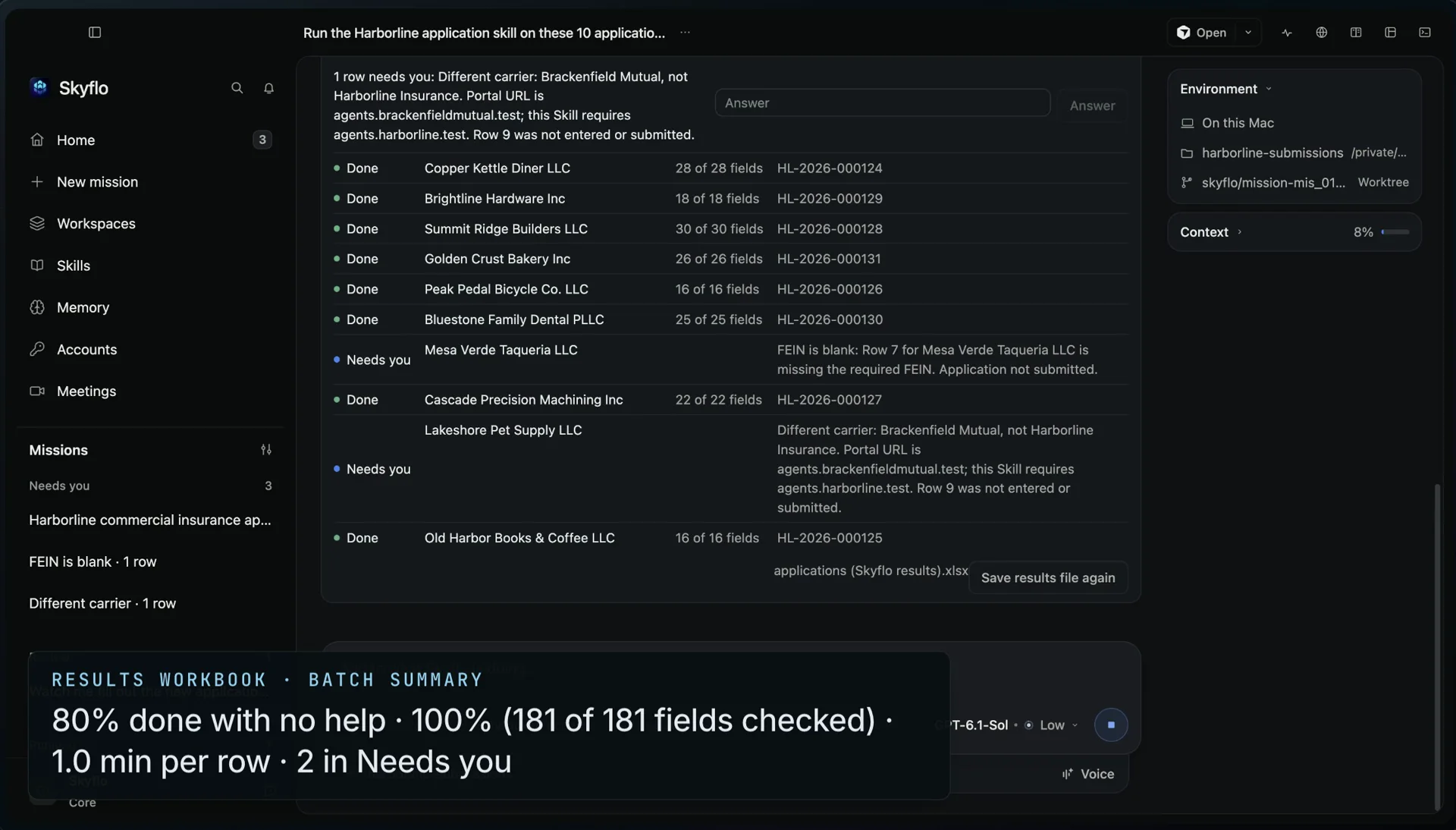
Results workbook: 80% done with no help · 100% (181 of 181 fields checked) · 1.0 min per row · 2 in Needs youOne continuous take on Skyflo 1.8.0. Synthetic applicants and sample carrier portals.
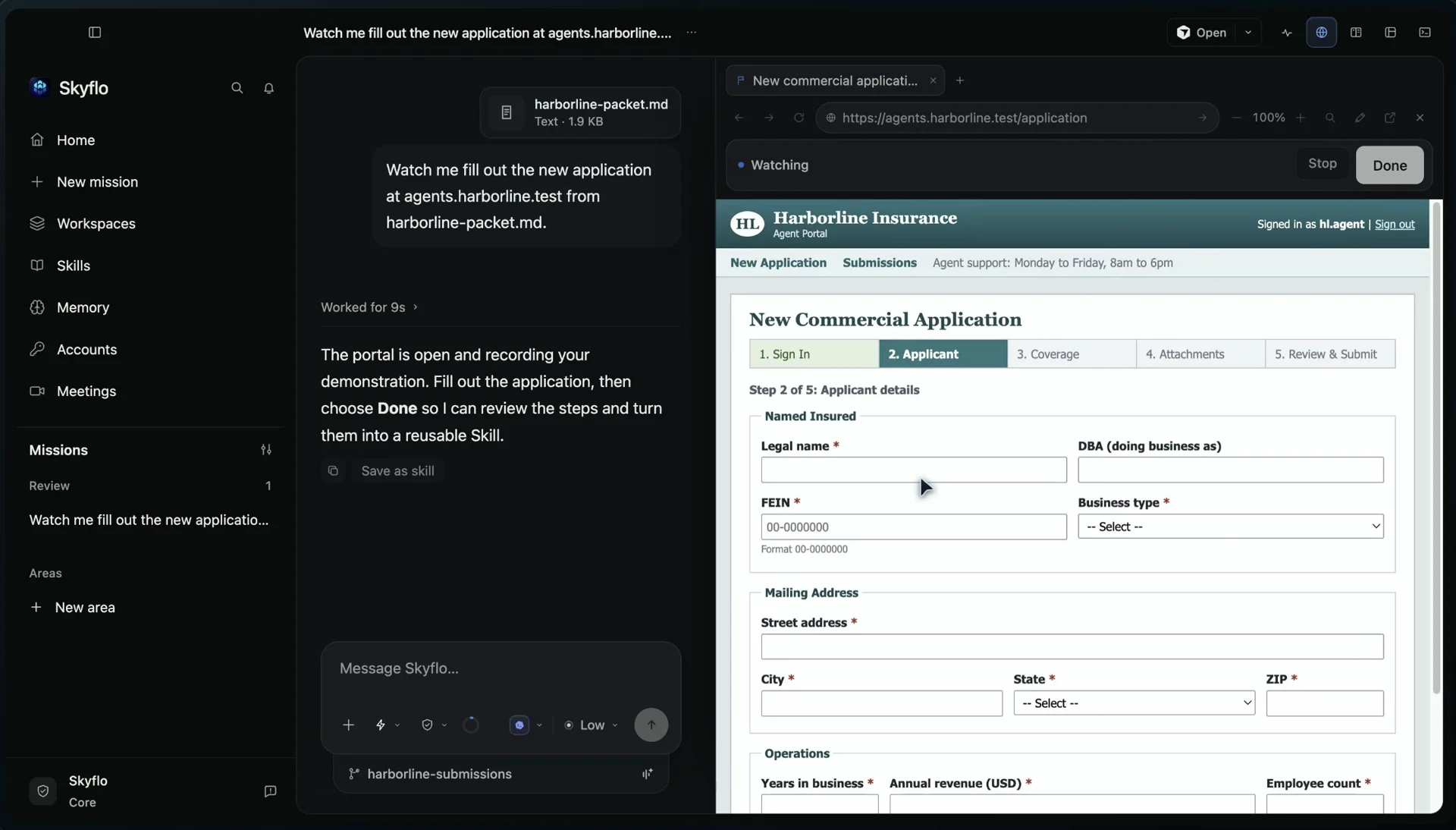
1Teach it once
Fill out the application in Skyflo's browser while it watches. Skyflo turns what you did into a Skill and names it.
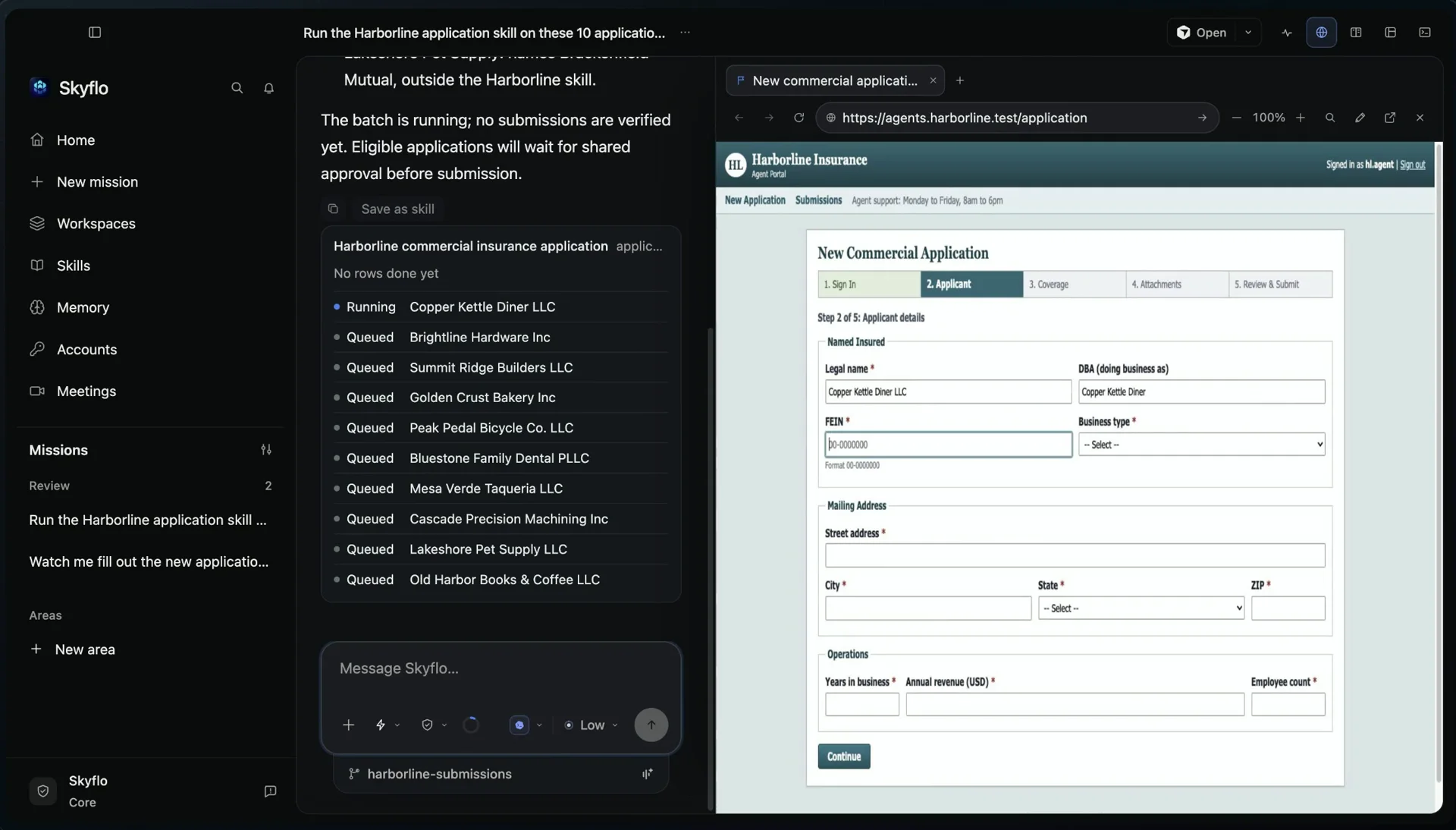
2Hand it the spreadsheet
Attach ten applications. Each row runs in its own browser tab, three at once, while you keep working.
3Approve once
Eight rows wait at the final Submit. Two need you: a blank FEIN, a different carrier. One approval submits the eight.
A results workbook for the batch: status, reference and fields checked for every row
A form revision that renamed a field was still filled correctly
After three clean runs, Skyflo offers to let the Skill submit on its own
A mismatch or your reversal takes that back
More work to teach once and run on every row
Supplier onboarding
Enter each new vendor from your sheet into the supplier portal, with the documents each one needs.
Every vendor entered, the final step held for you
Benefits changes
Apply a month of enrollment changes in the benefits administrator, one employee per row.
A results workbook to file with payroll
Listings across marketplaces
Update prices and stock on each marketplace's seller page from one product sheet.
Each listing updated, each change checked
Status checks
Look up every open claim, order or permit on its portal and write the status back to your sheet.
Connect Gmail and Calendar, and each item arrives on Home with a next step. Areas say what Skyflo may finish on its own. The morning brief tells you what it did.
The brief
Morning triage
Go through my mail and calendar each morning. Draft a reply only where one is needed, answer the meeting requests I should accept, and keep hiring in its own area. Prepare everything for my approval.
Works from
Gmail and Calendar, connected once, and the hiring area's playbook
Stays with you
You send the replies and decide which meetings to take.
What comes backExample
HomeMonday, 8:30
Needs you
Office move: 21 or 28 November? A reply is drafted. Pick the date.[1]
Needs you
Weekly sync, Monday 16:00. Accept or decline.[2]
Review
Q4 hiring plan, drafted in the hiring area before Thursday.
Did
Read the new threads. Those that needed no reply got none.
[1] Gmail thread
[2] Calendar event
More your desk work to hand off
Morning and evening briefs
Lead with what Skyflo did, then the decisions that are yours. Urgent items do not wait for the next brief.
Two briefs a day on Home
Areas with limits
Give hiring, finance or customers their own area, with a playbook agents keep current and limits no agent can edit.
Work prepared for approval, then more authority once it has earned it
Decide, one item at a time
Work through everything that needs you with the evidence beside each choice, or talk it through by voice.
An empty Needs you lane
Meetings, prepared
A calendar event can start a mission that prepares the call from your notes and public sources.
A brief before you join
Engineering
Ship one change across every repository.
Use Skyflo's own agent, or connect Claude Code, Codex or Cursor Agent. Skyflo carries the change through each repository, runs the checks and leaves it ready for your review.
The brief
Cross-repository change
Make the tenant header contract explicit across storefront-web, checkout-api and platform-infra.
Works from
Three repositories in one workspace, with their tests
Stays with you
You review the changes and merge.
What comes backRecorded on Skyflo for Mac 1.5.4
Mission resultAbout a minute
storefront-web
checkout-api
platform-infra
Ran
Cursor Agent in Auto, with Sandboxed access.
Changed
One TENANT_HEADER constant per app, both request paths wired through it, documented once in platform-infra.
Checked
A contract test on each side pins the spelling. All 8 tests passed.
For you
Review the changes and merge.
More engineering work to hand off
Features across repositories
Carry one feature through the API, its clients and the contract between them.
A change in each repository and the checks that ran
Can Skyflo fill out the same form for every row of a spreadsheet?
Yes. Fill it out once while Skyflo watches and it becomes a Skill. Hand the Skill a spreadsheet: each row runs in its own browser tab, one approval covers the ready rows, and a results workbook shows what finished.
Can Skyflo handle my email and calendar?
Connect Google and your mail and calendar arrive on Home with a next step: a reply drafted only when one is needed, an RSVP, or a mission to start. You approve what goes out.
How can AI agents help an engineering team?
They carry a change through every repository it touches: the API, its clients and the contract between them. Run Claude, ChatGPT or Cursor in one mission, split larger work across specialists with Orchestrate, and review the changes before you merge.
How can AI agents help a sales team?
They take on the preparation around selling: account research, meeting briefs, call follow-ups, pipeline reviews and battlecards. Give Skyflo your notes, exports and the public sources to read, and it returns work that cites where each fact came from. You run the meeting and send the email.
What marketing work can AI agents take on?
Launch plans with owners, dates and approval gates, launch drafts, competitor messaging maps, repurposed content and a weekly campaign readout. Drafts stay in your workspace until you publish them.
Will Skyflo send emails or submit forms for me?
Only as far as you allow. Outside Full access, Skyflo stops before anything that submits, sends or pays, and asks you first. An area's limits, which no agent can edit, set what it may finish on its own.
Do we have to replace the AI tools we already use?
No, and you do not need existing agents before starting either. Start with Skyflo's own agent, or run Claude, ChatGPT, Cursor and other supported agents inside a mission under one access mode, switching as the work changes.
What can Skyflo work with?
Files and attachments it reads, including spreadsheets and PDFs, websites, any Mac app through computer use, Gmail and Calendar, a terminal and schedules. Paid plans add saved website sign-ins.
How does a team get started?
Start with one person and one real job. Team and Team Max put your team on one bill, with members, roles and included usage shared across the organization. Larger rollouts begin with a pilot of two to five people.
What does it cost?
Free runs Skyflo's own agent with your Moonshot or Z.ai key, or the agents you already use on their own sign-ins, without a card. Core, Pro and Max add Skyflo's included models, Voice Mode and Skyflo Cloud. Agent subscriptions and model keys you bring are billed by their providers.
Looking for Kubernetes troubleshooting, CI/CD or progressive delivery? Those belong to the Skyflo Kubernetes agent, a separate Apache-2.0 project, deprecated since October 2, 2026. Kubernetes agent use cases
Which job will you hand off first?
Pick one you need done this week. Write the brief, and see what comes back.