
Keeps everything open in one place
Home holds what your missions, inbox and calendar need from you, sorted by who moves next, with a one line reason for each item.
Skyflo reads your mail, calendar and missions, works ahead within the limits you set, and brings you only the decisions that are yours.
An AI chief of staff for founders and team leads: Home, areas, daily briefs and your inbox, on the agentic operating system for your company.
What an AI chief of staff is.
An AI chief of staff is the layer above your agents that keeps every obligation visible in one place, ranks what needs your judgment first, brings each decision with its evidence, and closes every loop within the limits you set.
Most tools with this name summarise your inbox or your calendar. Skyflo reads them too, then holds each obligation, starts the work within your limits, coordinates the agents doing it and brings you the decision when it needs one.
Four jobs, each one a shipped behaviour of Desktop 1.8.0. The detail sits in Home, in your areas, and in the record every mission keeps.
Home holds what your missions, inbox and calendar need from you, sorted by who moves next, with a one line reason for each item.
Areas say what Skyflo owns. Each area is a folder with a playbook agents keep current, and within its limits Skyflo starts the work and tells you afterwards.
A brief every morning and evening leads with what Skyflo did. Decide then works through what is yours, one item at a time, with the evidence beside each choice.
Agents work in any Mac app and website, sign in without seeing your passwords, and read the files you attach. Teach a task once and it becomes a Skill that runs on every row of a spreadsheet.
Every loop sits in one lane, by who moves next. Skyflo ranks Needs you and writes a one line reason for each loop from the inputs that moved it.
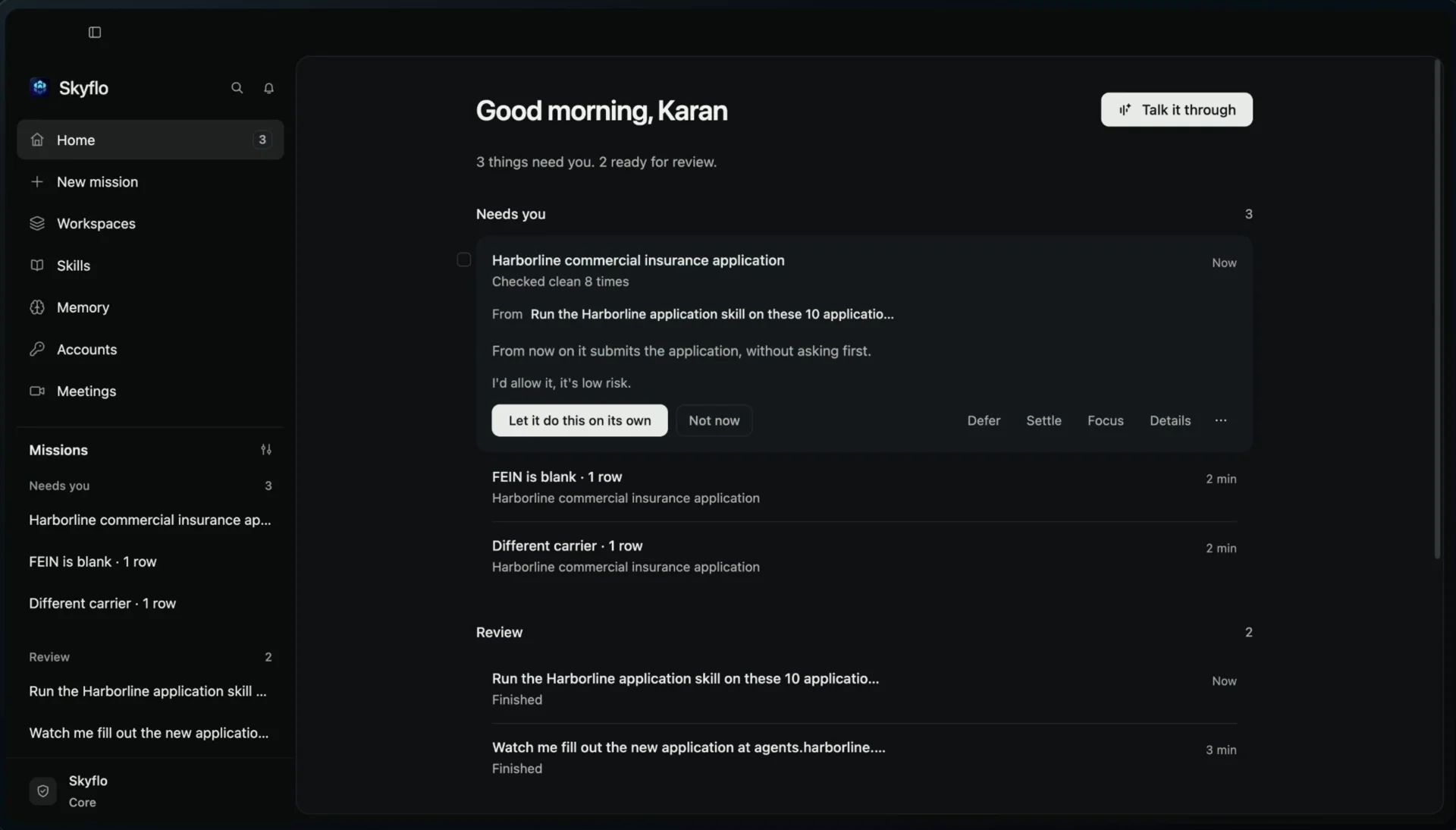
Home is the first item in the sidebar and opens by default. Its badge counts only the loops blocking work in Needs you. Turn it off any time with the Home and lanes setting, and the missions list returns.
You choose the access mode for each mission. In Full access a mission runs without prompting, by design. In every mode, these lines hold.
Sign-ins follow the same rule. Missions use your saved, 1Password or Bitwarden sign-ins while the passwords stay in your Keychain and never enter a prompt.
The layer above your agents that keeps every obligation visible, ranks what needs you, brings the decision with its evidence, and closes each loop within your limits.
An assistant summarises and drafts when asked. A chief of staff holds the obligation itself, follows who moves next, and coordinates agents to finish the work.
It reads your mail and calendar, organises what needs you, drafts replies and starts missions within the limits you set for each area, then reports what it did. Anything beyond those limits waits for your decision in Decide.
You do, for each mission and each area. An agent cannot widen its own access, a rule you declared is never learned away, and outside Full access Skyflo asks before anything that submits, sends or pays. How access and approvals work.
No. Start with Skyflo's own agent, or connect Claude, ChatGPT and Cursor on their own sign-ins. Skyflo coordinates them in the same missions and Home.
Yes. The Home and lanes setting turns Home off and restores the missions list. Your missions, record and memory stay as they were.
Start with Skyflo's own agent or connect the agents you already use. Home keeps what needs you in one place while the work moves.
Start free. macOS 14+, Apple silicon and Intel. Agent subscriptions and model keys you bring are billed by their providers.